
For making sure, before you find the sync cable for HxD series digital back, you need to have a solution regarding a power source for the digital back because HxD digital back doesn’t include any battery when you detach it from the camera body.
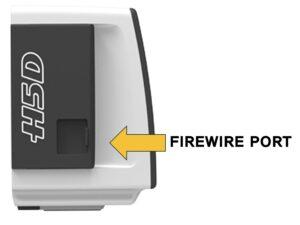
Power Source Option 1: FireWire from Computer
if you are using the digital back in your studio with a computer, the digital back can also receive power through a Firewire cable from the computer without using another power source.
Also there are power banks for FireWire port. They are useful idea for mobile environment without computer.
 Power Source Option 2: Hasselbald Battery Adapter H (Model# 3053310)
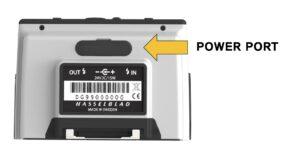
Recent models of Hasselblad digital back like H4D 60, H5D or H6D have the dedicated power input port (12v or 24v).
H1D, H2D, H3D, and H4D (31, 40, 50, 200MS) don’t have the power input port. They only can be powered on by FireWire port
 Hasselbald provides Battery Adapter for H.
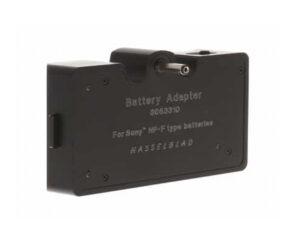
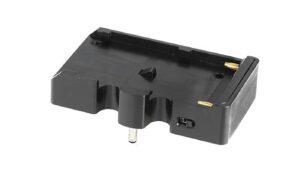 If you have a knowdege how to make power adapter, you can make the adapter or power bank yourself too.
Sync Cable
If you prepare the solution for the power source like the above, now you need to prepare a sync cable to operate RB67 / RZ67 and HxD with our adapter.
Please be aware that H1D cannot be worked with our adapter because H1D doesn’t have the Sync-In port.
PC Sync to 2.5mm Jack male
https://a.co/d/c4GYbjk
You need to connect the 2.5mm jack to “Sync-In” port on the side of the digital back.
Also, you need to select the camera type in the menu of your digital back to ‘Large Format’ type.
Power Source Option 2: Hasselbald Battery Adapter H (Model# 3053310)
Recent models of Hasselblad digital back like H4D 60, H5D or H6D have the dedicated power input port (12v or 24v).
H1D, H2D, H3D, and H4D (31, 40, 50, 200MS) don’t have the power input port. They only can be powered on by FireWire port
Hasselbald provides Battery Adapter for H.
If you have a knowdege how to make power adapter, you can make the adapter or power bank yourself too.
Sync Cable
If you prepare the solution for the power source like the above, now you need to prepare a sync cable to operate RB67 / RZ67 and HxD with our adapter.
Please be aware that H1D cannot be worked with our adapter because H1D doesn’t have the Sync-In port.
PC Sync to 2.5mm Jack male
https://a.co/d/c4GYbjk
You need to connect the 2.5mm jack to “Sync-In” port on the side of the digital back.
Also, you need to select the camera type in the menu of your digital back to ‘Large Format’ type.Still have a question? Contact us with your camera, digital back and sync cable.