Tag: Adapters & cameras

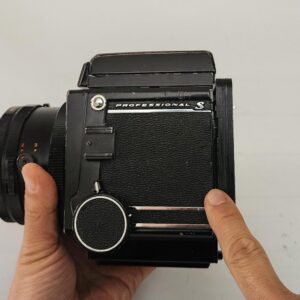
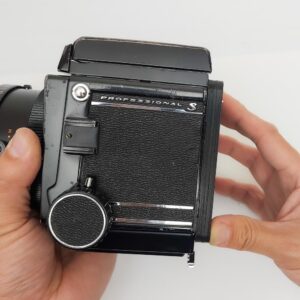
  • Why don’t you make RB67 adapters that can rotate?

    So far we don’t make the RB67 adapters that can rotate.

    It’s technically possible.
    The RB67’s rotation mechanism is structured in such a way that the digital back cannot be positioned close enough.
    Therefore, we ask users to remove the camera’s rotating part to attach our adapters.
    We had actually designed the rotating part ourselves. However, this would require thin metal milling, which would make the adapter more expensive.
    Our goal is to produce affordable 3D-printed products to make classic gear photographers happy.

    The structure of the RZ67, however, still enables the digital back to be positioned closer to the camera body.

    Still have a question? Contact us with your camera, digital back and sync cable.

    ← Back to all FAQs

  • Can I still use flash system with LensMod adapters?

    Regarding flash, you can still use a flash even though you have only one sync port on the lens.
    There are two options.

    1. Using PC sync split cable.
      You can add a Y- PC sync split cable on the PC port on the lens.
      This is the Y-PC sync split cable.
      https://www.amazon.com/gp/product/B0078ZCX6Y/ref=ppx_yo_dt_b_asin_title_o02_s00?ie=UTF8&psc=1
      Then one terminal of the split cable is connected to the main sync cable. The other terminal is connected to your flash or a transmitter.
    2. Using PC sync OUT port on the digital back
      If your digital back has a PC sync out port (Most digital backs have it.), you can connect your flash or transmitters through the out port and you can use flashes or strobes.

    Note some digital backs cannot capture the flashlight if the shutter speed exceeds 1/100 when certain lenses are used. However, this isn’t a big deal if you don’t use high-speed shutters with flash indoors.

    Still have a question? Contact us with your camera, digital back and sync cable.

    ← Back to all FAQs

  • Will Non D version of RZ67 work with LensMod adapter?

    Yes, any RZ67 series (RZ67 Pro, RZ67 Pro II, RZ67 Pro IID) can work with LensMod RZ67 adapters.

    RZ67 adapters are designed to work with any Mamiya RZ67 series, RZ67 Pro, RZ67 Pro II or RZ67 Pro IID without any modification of camera or digital back because the communication path between the camera and the digital back is through the standard PC sync ports.

    On the other hand, the original Mamiya adapter HX701, which communicates via contact pins on the adapter only supports RZ67 Pro IID.

    Still have a question? Contact us with your camera, digital back and sync cable.

    ← Back to all FAQs

  • How to do focus calibration for RB67?

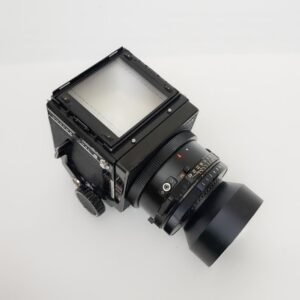
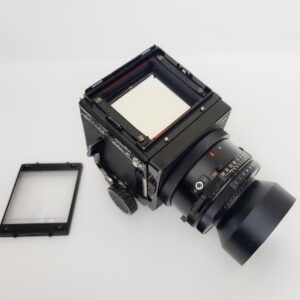
    Accurate focusing in most medium format SLR cameras is affected by the focus screen, mirror, and flange-back distance. If you’re experiencing a focus issue, it can be difficult to pinpoint the exact cause. Therefore, it’s recommended to have a professional diagnose and adjust the focus. However, if you have a thorough understanding of these components and can identify the source of the focus issue, you can attempt calibration with the focus screen or body mount pins. Method 1: Adjusting the Focus Screen on Top of Camera 1) Remove the focus screen. 2) Mark the original position of each Adjustment Screw (4 screws). 3) Slightly rotate the Adjustment Screws to achieve proper focus. We recommend turning them in small increments (about 45 degree) each time you check focus. You may need a precision tool for this task. Turning 180 degree makes about 0.1mm movement.
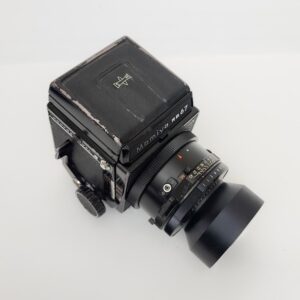
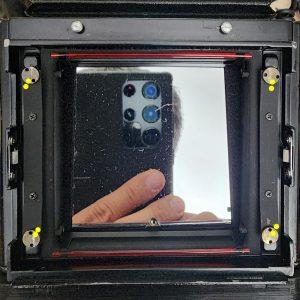
    • Counterclockwise (Focus Screen Goes Up): Focus will move front to back. (Treatment for front-focused issue)
    • Clockwise (Focus Screen Goes Down): Focus will move back to front. (Treatment for back-focused issue)
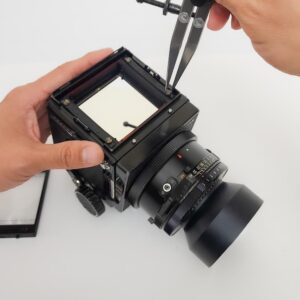
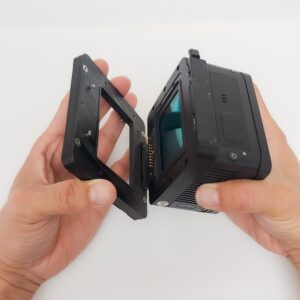
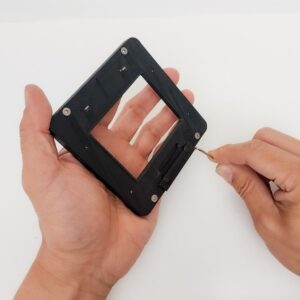
    Method 2: Adjust the Body Mount Pins on the Adapter The adapter allows for minor focus adjustments by modifying the height of the Body Mount Pins (4 screws) used for mounting the camera body. (See instructions linked next for details on adjusting the Body Mount Pin length.[ LINK ] ) If the focus is back-focus, follow the steps below.
    1. Turn each of the 4 pins counter-clockwise in small increments (30 ~90 degrees each). It’s important to turn all 4 pins by the same amount.
    2. Repeat step 1 with 30 degrees until you achieve the desired focus.
    3. Important: Do not turn the pins more than a total of 720 degrees (two complete rotations).
    Important: Avoid turning the screws more than a full rotation (360 degrees). If you reach this point and still experience focus issues, it likely stems from other factors on the camera and cannot be resolved with this method. If the focus is front-focus, follow the steps above with clockwise direction.

    Still have a question? Contact us with your camera, digital back and sync cable.

    ← Back to all FAQs

  • How to adjust mounting the adapter on my RB67

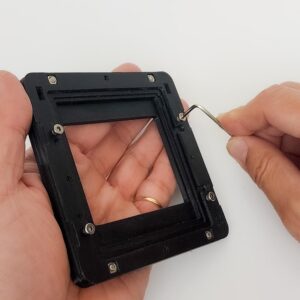
    If the adapter is not perfectly fit on your camera body or your digital back, please follow the processes below. Mounting Adapter and Sensor (Adjusting the Support Hooks at the bottom) If the Support Hooks (2 screws) at the bottom are too loose and the bottom of the digital back wobbles, or the space under the Support Hooks is too tight for the clasp of the digital back to fit underneath, adjust the height of the bottom Support Hooks by turning them slightly using a 2mm Hex Key. Turn the screws 45 degrees at a time and check the fit of the mount. Mounting Adapter and Camera Body (Adjusting the Body Mount Pins) When connecting the adapter to the camera body, if there is a gap between the body and the adapter, or if you cannot lock the locking lever at the bottom because the Body Mount Pins are too short, adjust the height of each Body Mount Pin by turning them slightly using a 2mm Hex Key. Turn the screws 45 degrees at a time and check the fit of the mount.
    • To tighten the Body Mount Pins to shorten the gap: Turn the screws clockwise.
    • To loosen the Body Mount Pins to fix the lever issue: Turn the screws counterclockwise.
    Important:
    • After adjusting the Body Mount Pins, your camera may need focus calibration by adjusting the focus screen on top.
    • Do not perform this adjustment unless you experience a mounting issue, as it can affect proper focusing. Also, avoid turning the screws more than a full rotation (360 degrees).

    Still have a question? Contact us with your camera, digital back and sync cable.

    ← Back to all FAQs